Getting Started with gmStudio
Installation
Section titled “Installation”This page describes the gmStudio installation package and the requirements for running gmStudio.
Hardware Requirements
Section titled “Hardware Requirements”One of the first steps in any migration effort is to provision a development machine that will be used to perform migration work. This is typically one of the workstations already being used in maintaining and building the source codebase.
In terms of disk, CPU, and memory this machine should be sized appropriately for a .NET development workstation using Visual Studio — the bigger the better.
The methodology produces many outputs: logs, model files, reports, .NET codes and assemblies. Plan for about one gigabyte of disk space for these files.
Development Workstation Requirements
Section titled “Development Workstation Requirements”Required
- Windows XP through Windows 10, Windows Server 2003-2016
- .NET 4.0 or higher Framework SDK
Recommended
- VB6 to validate/build VB6 codes
- IIS to validate ASP sites
- Visual Studio 2017 or higher (or other application associated with csproj/vbproj files).
- Your choice of a programmer’s text editor; we use Notepad++ (default = notepad.exe, not recommended) Note: when running as Visual Studio Plugin, the VS editor will be used
- Your choice of a file and directory comparison tool; we use BeyondCompare from Scooter Software
- Your choice of tab-delimited file viewer (launched by associated application); we use Excel
Installed Files
Section titled “Installed Files”gmStudio Product
gmStudio is installed by a Windows Installer setup file (gmStudioSetup.msi).
To install gmStudio, run the gmStudioSetup.msi file.
The following directories are created by the gmStudio installation process:
[INSTALLDIR]: gmStudio application and default application configuration file | \---support: default translation config files | +---help: local redirect to (this documentation) +---metalang: default language description and transformation rules<br /> +---rules: Sample rules, templates, and scripts <br /> +---runtime: migration support assembly (use optional) +---settings: default gmStudio script templates \---tools: gmStudio system toolsgmStudio Samples
The gmStudio samples are available as zip files as described in this Samples section of the manual.
gmStudio Working Configuration
The first time you run gmStudio, it will create your gmStudio workspace and populate it with copies of the default configuration files.
By default the gmStudio workspace will be created in the [AppDataFolder] folder. The default on Windows is:
C:\Documents and Settings\[current_user]\Application Data\You may set the AppDataFolder on the User Config form to specify the location of AppDataFolder.
The following directories are created by the workspace setup process:
[AppDataFolder] | \---GreatMigrations | +---workspace: will contain your migration workspaces and migration project filesVerifying the Install
Section titled “Verifying the Install”The process described below does a direct, default migration of a small project (comprised of two VBPs); it can also be used to verify your installation.
When you load gmStudio for the first time, you will see the Wizard Form. Normally the application reloads the migration project from your last session, but if this is your very first session, the Main Form will be blank.
You can do a direct migration of a small project in two steps:
-
Select the VB6 projects to migrate:
-
- a) Click [File/New Migration] from the main menu. This will open the [Migration Project Setup] form.
-
- b) Enter a name for your migration project; the default is Upgrade1.
-
- c) Use the [Select Migration Units] control to find and select VBPs.
-
-
- d) Click [Add] to add VBPs to the migration project
-
-
-
e) Click [Save & Exit] to return to the Main Form.
-
-
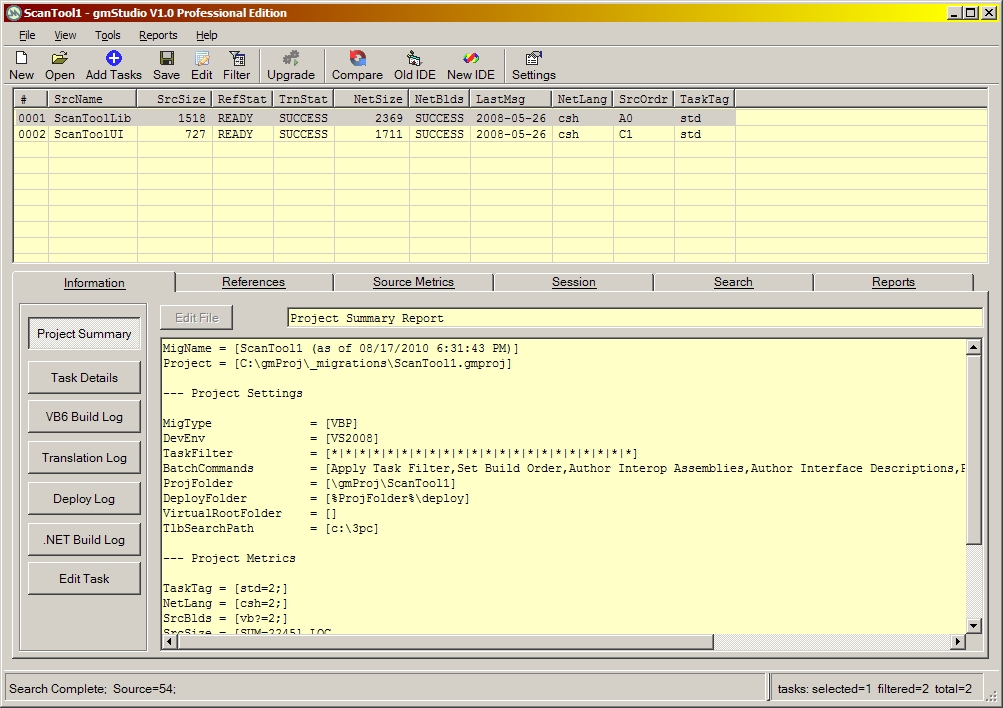 2. Run the migration process by clicking the [Upgrade] button on the Toolbar.
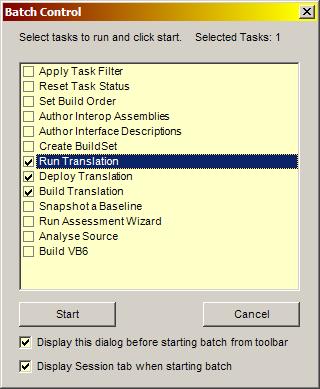
If you have successfully installed gmStudio, you will get a log file similar to the one shown below. The log shows the default migration steps for a two-VBP sample migration project:
- Preparation
- Translation
- Deployment
- Verification (by building the .NET code using MSBuild)
Starting BatchSet Build OrderSetup Build OrderCompute Build OrderApply Build OrderREADY: See C:\GMS\samples\workspace\DemoScanTool\report\Interop2_csh-SrcOrder.txtAuthor Interop AssembliesLoading Interface CacheScanning References: C:\GMS\samples\source\ScanTool\ScanToolLib_VB6\ScanToolLib.vbpScanning References: C:\GMS\samples\source\ScanTool\ScanToolUI_VB6\ScanToolUI.vbpImporting: stdole2.tlbImporting: TLBINF32.DLLImporting: scrrun.dllImporting: ScanToolLib.dllImporting: msxml4.dllImporting: ComDlg32.OCXValidating: C:\GMS\samples\source\ScanTool\ScanToolLib_VB6\ScanToolLib.vbpLibRegd = SUCCESSRefStat = READYSrcSize = 1518Validating: C:\GMS\samples\source\ScanTool\ScanToolUI_VB6\ScanToolUI.vbpLibRegd = SUCCESSRefStat = READYSrcSize = 727Syncing Project FileValidation CompleteAuthor Interface DescriptionsLoading Interface CacheScanning References: C:\GMS\samples\source\ScanTool\ScanToolLib_VB6\ScanToolLib.vbpScanning References: C:\GMS\samples\source\ScanTool\ScanToolUI_VB6\ScanToolUI.vbpGenerating Interface Description for: stdole2.tlbGenerating Interface Description for: TLBINF32.DLLGenerating Interface Description for: scrrun.dllGenerating Interface Description for: ScanToolLib.dllGenerating Interface Description for: msxml4.dllGenerating Interface Description for: ComDlg32.OCXUpdating Interface CacheValidating: C:\GMS\samples\source\ScanTool\ScanToolLib_VB6\ScanToolLib.vbpLibRegd = SUCCESSRefStat = READYSrcSize = 1518Validating: C:\GMS\samples\source\ScanTool\ScanToolUI_VB6\ScanToolUI.vbpLibRegd = SUCCESSRefStat = READYSrcSize = 727Syncing Project FileValidation CompleteReset Task StatusReset: C:\GMS\samples\source\ScanTool\ScanToolLib_VB6\ScanToolLib.vbpLastMsg = ResetNetSize = -1Run TranslationTranslating C:\GMS\samples\source\ScanTool\ScanToolLib_VB6\ScanToolLib.vbpBasic Processor V9.80 (BETA.002) System Build(8/27/09 15:14:45)Processing file: C:\GMS\samples\source\ScanTool\ScanToolLib_VB6\ScanToolLib.vbpProcessing file: C:\GMS\samples\source\ScanTool\ScanToolLib_VB6\ScanToolLib.basProcessing file: C:\GMS\samples\source\ScanTool\ScanToolLib_VB6\clsVBPRefReporter.clsProcessing file: C:\GMS\samples\source\ScanTool\ScanToolLib_VB6\clsDirList.clsProcessing file: C:\GMS\samples\source\ScanTool\ScanToolLib_VB6\clsVBPBinReporter.clsProcessing file: C:\GMS\samples\source\ScanTool\ScanToolLib_VB6\clsCOMReporter.clsProcessing file: C:\GMS\samples\source\ScanTool\ScanToolLib_VB6\clsVBPModReporter.clsProcessing file: C:\GMS\samples\source\ScanTool\ScanToolLib_VB6\clsVBPCntReporter.clsProcessing file: C:\GMS\samples\source\ScanTool\ScanToolLib_VB6\clsVBPSrcReporter.clsProcessing file: C:\GMS\samples\source\ScanTool\ScanToolLib_VB6\clsScanControl.clsLoading reference:<stdole2.tlb> C:\GMS\samples\workspace\DemoScanTool\idf\FromIdl\stdole2.tlb.xmlLoading reference:<Mig.stdole2.tlb> C:\GMS\support\lang\Mig.stdole2.tlb.xmlLoading reference:<TLBINF32.DLL> C:\GMS\samples\workspace\DemoScanTool\idf\FromIdl\TLBINF32.DLL.xmlLoading reference:<scrrun.dll> C:\GMS\samples\workspace\DemoScanTool\idf\FromIdl\scrrun.dll.xmlLoading reference:<msxml4.dll> C:\GMS\samples\workspace\DemoScanTool\idf\FromIdl\msxml4.dll.xmlReprocessing file: C:\GMS\samples\source\ScanTool\ScanToolLib_VB6\ScanToolLib.basReprocessing file: C:\GMS\samples\source\ScanTool\ScanToolLib_VB6\clsVBPRefReporter.clsReprocessing file: C:\GMS\samples\source\ScanTool\ScanToolLib_VB6\clsDirList.clsReprocessing file: C:\GMS\samples\source\ScanTool\ScanToolLib_VB6\clsVBPBinReporter.clsReprocessing file: C:\GMS\samples\source\ScanTool\ScanToolLib_VB6\clsCOMReporter.clsReprocessing file: C:\GMS\samples\source\ScanTool\ScanToolLib_VB6\clsVBPModReporter.clsReprocessing file: C:\GMS\samples\source\ScanTool\ScanToolLib_VB6\clsVBPCntReporter.clsReprocessing file: C:\GMS\samples\source\ScanTool\ScanToolLib_VB6\clsVBPSrcReporter.clsReprocessing file: C:\GMS\samples\source\ScanTool\ScanToolLib_VB6\clsScanControl.clsReprocessing file: C:\GMS\samples\source\ScanTool\ScanToolLib_VB6\ScanToolLib.basLoading reference:<vb6control.dcl> C:\GMS\support\lang\vb6control.dcl.xmlLoading reference:<dao350.dll> C:\GMS\support\lang\dao350.dll.xmlReprocessing file: C:\GMS\samples\source\ScanTool\ScanToolLib_VB6\clsVBPRefReporter.clsReprocessing file: C:\GMS\samples\source\ScanTool\ScanToolLib_VB6\clsDirList.clsReprocessing file: C:\GMS\samples\source\ScanTool\ScanToolLib_VB6\clsVBPBinReporter.clsReprocessing file: C:\GMS\samples\source\ScanTool\ScanToolLib_VB6\clsCOMReporter.clsReprocessing file: C:\GMS\samples\source\ScanTool\ScanToolLib_VB6\clsVBPModReporter.clsReprocessing file: C:\GMS\samples\source\ScanTool\ScanToolLib_VB6\clsVBPCntReporter.clsReprocessing file: C:\GMS\samples\source\ScanTool\ScanToolLib_VB6\clsVBPSrcReporter.clsReprocessing file: C:\GMS\samples\source\ScanTool\ScanToolLib_VB6\clsScanControl.clsLastMsg = TRANSLATED:2009-09-08 10:39:17TrnStat = SUCCESSNetSize = 2196Deploy TranslationDeploying: C:\GMS\samples\workspace\DemoScanTool\log\Interop2_csh-ScanToolLib-iop2-csh.bndLastMsg = DEPLOYED:2009-09-08 10:39:17Build TranslationBuilding: C:\GMS\samples\workspace\DemoScanTool\deploy\ScanToolLib_iop2_csh\ScanToolLib.csprojLastMsg = .NET BUILD COMPLETED: 2009-09-08 10:39:18NetBlds = SUCCESSReset Task StatusReset: C:\GMS\samples\source\ScanTool\ScanToolUI_VB6\ScanToolUI.vbpLastMsg = ResetNetSize = -1Run TranslationTranslating C:\GMS\samples\source\ScanTool\ScanToolUI_VB6\ScanToolUI.vbpBasic Processor V9.80 (BETA.002) System Build(8/27/09 15:14:45)Processing file: C:\GMS\samples\source\ScanTool\ScanToolUI_VB6\ScanToolUI.vbpProcessing file: C:\GMS\samples\source\ScanTool\ScanToolUI_VB6\ScanTool.frmProcessing file: C:\GMS\samples\source\ScanTool\ScanToolUI_VB6\ScanToolUI.basLoading reference:<stdole2.tlb> C:\GMS\samples\workspace\DemoScanTool\idf\FromIdl\stdole2.tlb.xmlLoading reference:<Mig.stdole2.tlb> C:\GMS\support\lang\Mig.stdole2.tlb.xmlLoading reference:<scrrun.dll> C:\GMS\samples\workspace\DemoScanTool\idf\FromIdl\scrrun.dll.xmlLoading reference:<ScanToolLib.dll> C:\GMS\samples\workspace\DemoScanTool\idf\FromIdl\ScanToolLib.dll.xmlLoading reference:<TLBINF32.DLL> C:\GMS\samples\workspace\DemoScanTool\idf\FromIdl\TLBINF32.DLL.xmlLoading reference:<msxml4.dll> C:\GMS\samples\workspace\DemoScanTool\idf\FromIdl\msxml4.dll.xmlLoading reference:<ComDlg32.OCX> C:\GMS\samples\workspace\DemoScanTool\idf\FromIdl\ComDlg32.OCX.xmlReprocessing file: C:\GMS\samples\source\ScanTool\ScanToolUI_VB6\ScanTool.frmReprocessing file: C:\GMS\samples\source\ScanTool\ScanToolUI_VB6\ScanToolUI.basLoading reference:<shell32.dcl> C:\GMS\support\lang\shell32.dcl.xmlReprocessing file: C:\GMS\samples\source\ScanTool\ScanToolUI_VB6\ScanTool.frmLoading reference:<vb6control.dcl> C:\GMS\support\lang\vb6control.dcl.xmlLoading reference:<dao350.dll> C:\GMS\support\lang\dao350.dll.xmlReprocessing file: C:\GMS\samples\source\ScanTool\ScanToolUI_VB6\ScanToolUI.basLastMsg = TRANSLATED:2009-09-08 10:39:18TrnStat = SUCCESSNetSize = 1689Deploy TranslationDeploying: C:\GMS\samples\workspace\DemoScanTool\log\Interop2_csh-ScanToolUI-iop2-csh.bndLastMsg = DEPLOYED:2009-09-08 10:39:19Build TranslationBuilding: C:\GMS\samples\workspace\DemoScanTool\deploy\ScanToolUI_iop2_csh\ScanToolUI.csprojLastMsg = .NET BUILD COMPLETED: 2009-09-08 10:39:20NetBlds = SUCCESSBatch Complete. Elapsed Time= 0:0:14.484The default translation uses Interop for all COM externals and is written in the default .NET language (C#).
The entire process should take less than a minute for “small” codes. Most of the time will be spent in preparation steps — creating interface descriptions and Interop assemblies. The preparation steps typically only need to be redone if you change the external dependencies of your codebase. The translation itself is extremely efficient:
-- VBPs referencing up to 50K lines of code (LOC) should finish in under 5 seconds. -- VBPs referencing 50-100K lines should finish in under 20 seconds. -- VBPs referencing 100-200K lines should finish in under 30 seconds. -- VBPs referencing 200-400K lines should finish in under 50 seconds. -- VBPs referencing 400-600K lines should finish in under 70 seconds.Note that translation runtime is not directly proportional to the number of lines. The runtime is sensitive to the total number of symbols and atomic operations defined in the codebase being translated. This includes all identifiers declared by the VB6 code as well as all the identifiers declared in referenced COM components and all operations in the code.
Outputs
Section titled “Outputs”The .NET project files will be in the default deployment folder
[INSTALLDIR]\samples\workspace\[name]\deploy\[project]_std_[lang].The log files from all of the migration steps will be created in the workspace\log folder
      [INSTALLDIR]\samples\workspace\[name]\log
where:
      [name] is the name you entered for your migration project.
      [project] is the name of the VBP file selected above.
      [lang] is "csh" for C# or "vbn" for VB.NET depending on the task settings
Where can you go from here?
Section titled “Where can you go from here?”- You can inspect the generated code (written in the files of the deployment folder) by selecting a migration task and right clicking [Open .NET Project Folder] from the context menu.
- You can try to compile the generated code by clicking the [DevEnv] button on the Toolbar (and thus opening the .NET project in Visual Studio).
- You can use gmStudio to browse, analyze, and summarize the various migration logs.
- You can read the remaining sections of this guide, experiment and explore.
- You can contact us for a assistance or a guided tour.