Government Agency Electoral Register System (VB6/ASP)
Upgrading ERS to .NET
Section titled “Upgrading ERS to .NET”A Government Agency (GA) uses the Electoral Register System (ERS) to import, export, maintain, and report a wide variety of information associated with the state Voter Rolls. The state voter rolls contain more than five million people that participate in state, municipal, and provisional elections. These elections and other ongoing activities depend on accurate, up to date voter rolls. ERS helps the GA ensure the accuracy of the rolls and provide roll information to authorized parties in a timely manner.
Electoral System Testimonial
Section titled “Electoral System Testimonial”The government agency that completed this project is prohibited from publicly endorsing a vendor on the internet, however they are willing to discuss their success story directly with interested parties. Please contact Great Migrations to setup a reference call.
Project Scope
Section titled “Project Scope”Originally developed in the early 2000’s, ERS is a mature Windows-based, 3-tier, client-server application. Implemented almost completely in VB6/ASP/COM/COM+ with SQL Server databases, the application had been performing reliably for decades. Other applications at the GA are web based and running on the C#/.NET platform.
The system was 101 inter-related VBPs. The client application used a composite application architecture with dynamic navigation. The front end included 263 forms and 121 “workspace” user controls. The back end included a job scheduler server and an application server hosting 60 service components running in COM+ and implementing almost 1200 different services. The service components made extensive use of COM+ transactions and role-based security. There was also an ASP classic web site that provided pre-formatted, interactive data tables to the client application. The application also automated Microsoft Office and over 160 Crystal Reports.
In the “ERS Technical Upgrade Project”, the GA upgraded legacy ERS from VB6/ASP/COM to C#/.NET whilst retaining the business logic and functionality of the application. The operation of the application remained on the desktop to preserve user experience and facilitate regression testing. The project included version upgrades for all infrastructure: new application servers, web servers, database servers, and virtual user workstations. The build and installation of the application was upgraded to fit within the latest security constraints and conventions of the GA environments and DevOps. The project also included work to update, document and validate the comprehensive functional regression testing procedures for the system.
In support of this effort, Great Migrations LLC (GM) provided technical services to the GA in the areas of system redesign, application development, deployment, and testing activities. The GM team included a technical PM, two .NET upgrade solution developers, and a QA lead. The client team included project leadership, support for DevOps, testing, and transition as well as two senior .NET developers collaborating on important technical challenges and decisions.
Project Schedule
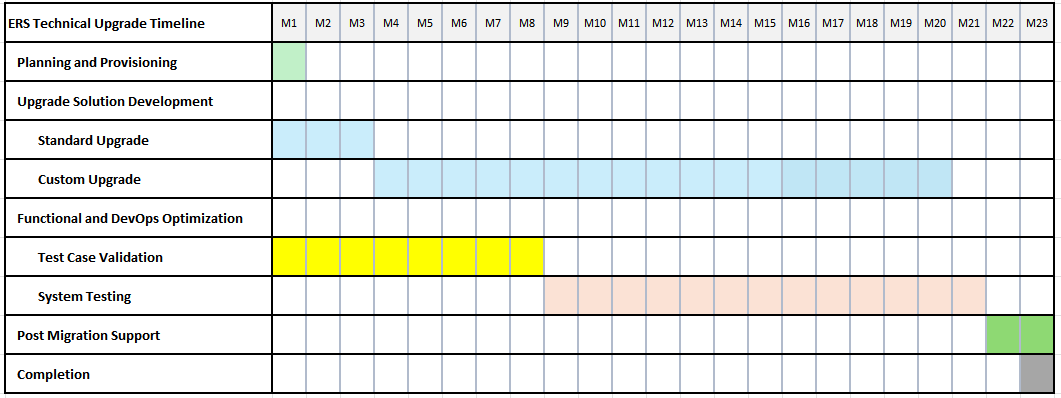
Section titled “Project Schedule”The project schedule (23 months) from planning to completion is summarized below:
Functional Equivalence
Section titled “Functional Equivalence”The critical measure of success for the project was passing all the formally documented and validated functional tests in both the system integration and user acceptance test environments. GM and the GA collaborated extensively on the tasks needed to meet this objective, beginning with seven months of test case definition, documentation, and validation using the legacy system. More than 3,000 test cases, comprising about 60,000 test steps, were created to define the functional scope of the legacy system. The test information was stored in an Azure Devops Test Plan which was used throughout the project for work management and progress tracking.
Technical Enhancements
Section titled “Technical Enhancements”The primary deliverable produced by GM was the C#/.NET version of the ERS legacy system. This code was produced by a completely automated, rule-driven translation process — achieved through GM’s agile Tool-Assisted-Rewrite methodology. This Custom Upgrade Solution for ERS reads, interprets, and rewrites the legacy system— comprising 101 VB6 projects referencing 1.46M VB6 lines of code (LOC), 17 ASP pages, and 69 external COM type libraries — and produces ERS.NET — a collection of 132 .NET projects referencing ~900K of C# LOC. Also generated by gmStudio, the resulting .NET projects are organized into a VS2022 solution that integrates the full ERS application stack and its dependencies for debugging and development. The GM Team also developed other assets to facilitate application debugging and automated deployment of the distributed application into dev and test environments.
As summarized below, the upgrade process delivered a number of major technical features:
- COM Upgrades
- COM+ Upgrade
- Upgrade Solution and Build/Package Pipeline
- ASP Site Upgrade
- Structural Upgrades
- Language Upgrades
- gmRTL Components and xUnit Tests
- PDF995 Replacement
- Custom CodeStyle
COM Upgrades
Section titled “COM Upgrades”Thirty COM API upgrade features were developed for the ERS Custom Upgrade. Where appropriate, Migration Unit Tests were developed to assist with researching and testing upgrade details independently of testing them in the integrated ERS application. In some cases, COM APIs were replaced by hand-coded .NET APIs starting from the support framework stub classes generated by gmStudio then extending or encapsulating .NET APIs. The table below summarizes the COM upgrades developed for RMS.
COM API | Comments |
ActiveBarLibrary | ActiveBar integrates menu and toolbar services through a single control. This control is upgraded to a hand-coded gmRTL.ActBar control that encapsulates WinForms MenuStrip and Toolstrip. |
ActiveDS | ActiveDS provides Active Directory services. The methods using ActiveDS were upgraded to hand-coded versions using the System.Directory API. |
ADODB | ADODB provides an extensive collection of Data Access Services. This API was upgraded to gmRTL.AdoLib, an emulation of ADODB powered by System.Data.SqlClient. Some of the special aspects of this upgrade included implementing the IDisposable pattern on Connections, Commands, and Recordsets and making sure Dispose was called to avoid connection leaks, schema caching, and auto-correcting inconsistencies in stored proc parameters between client and server. |
ComCtl2 | ComCtl2 is an older version of Windows Common Controls. Rules were added to standardize the system on MSComCtlLib — and the ComCtl2 dependence was removed. |
ComDlg | ComDlg provides Common Dialog services (File Open, File Save, Printer, etc). It was upgraded to gmRTL.ComDlg that encapsulates the WinForms Dialog classes. |
ComSvcsLib | ComSvcsLib is an API that exposes distributed computing platform services (COM+) to client code. COM+ was upgraded to System.EnterpriseServices. |
Crystal | Crystal is a template-driven reporting platform. Crystal Reports V8 was upgraded to Crystal.NET V13. Two support framework classes, CustomCrystalReportViewer and CrystalReportsApiInterfaceAdapter, were developed to facilitate the upgrade. |
DTS | Data Transformation Services. DTS was only used in a couple of functions. Operations formerly using DTS were upgraded to use a new hand-coded component that was automatically integrated into the .NET solution. |
EMSXTimeLine | The EMSXTimeLine was a custom UI control. As it was no longer used, it was removed from the application. |
Excel | Excel is used for report generation. It was upgraded to the DevExpress.Spreadsheet API. |
IMW32040 | IMW32040 is an imaging API. The VBP that used the Pegasus Imaging component was removed. |
INetCtlObjects | Internet Controls was used with Outlook integration. Outlook integration and the related inactive code were removed. |
GridEX16 and GridEX15 (JSGridEx) | These are the Janus Grid controls. There were two versions of Janus Grid used in the application having subtle differences in their APIs and behaviour. These two grid APIs were both upgraded to gmRTL.Grid that extended the DevExpress.XtraGrid to emulate Janus grid behaviours. |
MarkMarkerCOM | MarkMarkerCOM was an in-house COM API for integrating with a third-party GIS service. This API was replaced with hand-coded .NET MapMarker component supplied by the client. |
MSComCt2 | MSComCt2 provides various UI controls. Two of these controls were upgraded: DTPicker was replaced by WinForms.DateTimePicker with some helper methods. UpDown control was migrated to a gmRTL.UpdownControl derived from NumericUpdown. |
MSComctlLib | MSComctlLib provides various UI controls. Four of these controls were upgraded:
|
MSCommLib | Serial Communications for barcode scanner. The one file that used MSCommLib was upgraded to a hand-coded file using System.Net.Sockets. In addition, the GM Team used a serial port device emulator to test the upgrade on an Azure VM. |
MSDBGrid | MS Data Grid was not used in active code and was removed. |
MSFlexGridLib | MSFlexGridLib was not used in active code and was removed. |
MSHTML | HTML DOM services. MSHTML was upgraded to WinForms.HtmlDocument with some limited runtime support coming from gmRTL.MSHTML. |
MSXML2 | XML DOM services. MSXML2 was upgraded to System.XML with some limited runtime support coming from gmRTL.MSXML2. |
Outlook | Outlook integration was not used in active code. The inactive code was removed. |
RichTextLib | RichTextBox was upgraded to WinForms RichTextBox. |
RMSExceptionTx | This was an in-house .NET component that used ADODB and integrated through COM interop. It was upgraded to be compatible with RMS.NET COM+ data access conventions and integrated as a .NET component directly. |
Scripting | File IO and file system services. Scripting was upgraded to System.IO with some limited runtime support coming from gmRTL.Scripting. |
ShdocVW | WebBrowser Control services. ShdocVW was upgraded to the WinForms.WebBrowser control. |
TabDlg | TabControl was upgraded to DevExpress.XtraTabControl |
VBScript.RegExp | This was upgraded to use System.Text.RegularExpressions. |
Word | Word is used to generate mailing labels using Mail Merge. This code was rewritten to use the DevExpress.Document API. |
COM+ Upgrade
Section titled “COM+ Upgrade”Distributed Computing Services (DCOM) and the various RMS/EMS server components were upgraded to System.EnterpriseServices (SES). Service Interfaces and Components were decorated with the appropriate COM+ attributes and modified to use SES APIs. To facilitate debugging, the Service Components were implemented in a way that allow either in-process or distributed execution based on the build configuration.
Upgrade Solution and Build/Package Pipeline
Section titled “Upgrade Solution and Build/Package Pipeline”The upgrade process that rewrites the ERS legacy code to RMS.NET is 100% automated. This upgrade solution evolved continuously through the project and was used to generate code even for the final RMS.NET Release. The upgrade results were maintained in a GIT repo that was a CI pipeline trigger in Azure Devops. The pipeline rebuilt each new RMS.NET Release creating a set of artifacts for automated deployment into testing environments by the AutoDeploy process.
The end-to-end process from legacy VB6/ASP/COM code to a new C#/.NET release, ready for use in a testing environment, takes about 45-55 minutes:
- Automated Upgrade to rewrite the legacy code as .NET, ~10 minutes
- Pipeline to rebuild RMS.NET and create package artifacts in Azure DevOps, ~10-15 minutes
- Automated Deployment of artifacts to all servers and two test clients on Azure, ~25-30 minutes
ASP Site Upgrade
Section titled “ASP Site Upgrade”The ERS legacy application uses an ASP classic web site to search for and present Elector information. Web results requested by the user are presented in an interactive HTML table grid in a WebBrowser control. The ASP classic site was translated to ASP.NET with C# code behind using the same COM upgrade rules and conventions as the VB6 code translations. The resulting Web Application project is integrated with the rest of the RMS.NET projects for builds and deployments.
PDF995 Replacement
Section titled “PDF995 Replacement”PDF995 is a PDF Print Queue product that was used to display Crystal reports as PDF files. This was an archaic approach with cumbersome installation and usage conventions. The upgrade solution removed this component and reworked the logic to take advantage of Crystal.NET’s export to PDF capability. In one case, the Microsoft Print to PDF was used for a text printing use case.
Structural Upgrades
Section titled “Structural Upgrades”Structural Upgrade features alter the overall structure of files and folders that compose the .NET system.
Identical Files Consolidation
Section titled “Identical Files Consolidation”The legacy ERS codebase contained 76 shared files (i.e., files referenced by multiple VBPs) and 22 duplicate code files (i.e. files with identical content referenced from separate locations). Most of these were modules and forms with reusable content that could not be shared through DLLs so they were reused by referencing the file from every VBP that might need it.
The Custom Upgrade Solution includes rules to automatically a) translate shared/duplicate files so they are contained in a single .NET “host” project and b) modifying referencing projects use shared files from the host project. Shared/duplicated file consolidation produced a dramatic reduction in the total number of files and lines of code directly referenced by the application — reducing technical debt and making the new code much easier to work with.
Removing Build Cycles
Section titled “Removing Build Cycles”The legacy code had a case of late-binding that hid a circular dependency between two application components. This problem was resolved by restructuring the code.
Removing Unused Code
Section titled “Removing Unused Code”Identifying and removing unused code is an important consideration for upgrade projects. Carrying unused code is a “tax” on the project; but incorrectly removing code also impacts project efficiency and may result in downstream defects. The guiding principle is “only remove code that is proven not used and remove it in a way that is well-documented and non-destructive of the original source. gmStudio was used to a) identify Unused Code and b) guide and implement Unused Code removals. In addition, several other upgrade features made code obsolete, so it was removed.
Language Upgrades
Section titled “Language Upgrades”Language Upgrades relate to how VB6 language features are upgraded. There are many language issues that may be encountered when migrating from VB6 to C#, but their impacts vary based on details at runtime. Language issues are best addressed on a case-by-case basis during the testing phase of the project where they may be studied and have their resolutions validated under real-world testing conditions. Some of the more impactful language upgrade features implemented for RMS.NET are described below.
Generic Collections
Section titled “Generic Collections”The ERS system uses VB6 Collection classes in several places. These classes provide key and index access to elements, but their items are weakly typed. The GenericCollections upgrade was applied allowing these collections to be upgraded to strongly typed generic collections and improving the quality and performance of the .NET system.
Error Handling and On Error Resume Next
Section titled “Error Handling and On Error Resume Next”The ERS system uses On Error Resume Next (OERN) statement in over 13,000 locations. OERN is not supported in C#. By default, these statements are migrated to use a ResumeNext function that can emulate OERN in simple cases. This approach was altered to simply migrate OERN to a try-catch structure. In a few places, a simpler OERN emulation was inserted into the translations to preserve error handling and error propagation for exception logging functionality.
Improved Type Resolution
Section titled “Improved Type Resolution”The ERS application uses deliberate late binding in many places for various design patterns. The default translations employ dynamic casts to avoid build errors that would otherwise occur due to unresolved object.member references. Using dynamic can work, but it reduces readability and may fail at runtime. Various types of dynamic code were handled on a case-by-case basis and resolved by introducing interfaces and other techniques. The final RMS.NET code had no dynamic casts.
As New
Section titled “As New”The presence of As New in a VB6 declaration confers two important behaviours for the object declared:
- Just-in-time instantiation: the object is created automatically if it does not exist when it is used
- Reinstatiation: the object is recreated automatically if it is referenced after it is set to nothing
There is nothing precisely like As New in C#. By default, the translator migrates As New to simple object instantiation (e.g., = new). In some situations, problems arise with using As New if the instance is set to Nothing then subsequently used. In VB6, the instance will be recreated on use, but in .NET this will cause a null reference exception. Issues relating to As New migration were identified and resolved by various means.
Emulating VB6 Tab key Navigation
Section titled “Emulating VB6 Tab key Navigation”Tab key navigation in .NET differs from VB6 because it is “Hierarchical”: in addition to TabIndex order, focus flow also follows the UI containers (i.e., TabControl pages, Frames, Grids) on the form. If a container has the next Tabindex, focus will move into that container. Then tab flow will follow the order of the container’s children before moving to the next control outside of the container. To more faithfully emulate VB6 linear tab flow, GM implemented custom container classes. Inheriting from these classes, along with a few other design changes, reproduced the required Tab key navigation.
ComboBox
Section titled “ComboBox”ERS makes extensive use of ComboBoxes: they are used in almost every functional test. We modified the solution to upgrade all VB.ComboBox to a custom gmRTL.ComboBoxEx control that emulates VB.ComboBox more accurately.
CheckedListBox
Section titled “CheckedListBox”ERS has eight ListBoxes having style=Checked. We modified the upgrade to migrate all VB.ListBox with Style-Checked to a custom gmRTL.GUI.CheckedListBox control that emulates checked ListBox more accurately.
Custom CodeStyle
Section titled “Custom CodeStyle”The GM CodeStyle utility was enhanced to handle various coding style matters raised by the GA team:
- Vertical List: break long lines on meaningful semantic boundaries, such as arithmetic or relational operators
- Naming Conventions: rename variables according to specified naming standards
- Remove Usings: remove unnecessary using statements
- Remove Namespaces: shorten fully qualified names and add using statements as directed
- Class Disposal: change instance = null to instance.Dispose().
GM tested these features and found they worked as expected. Most of these dramatically change the appearance of the code — making change audits difficult. The Class Disposal feature was used as part of the ADODB upgrade — ensuring Connection instances were explicitly disposed rather than simply being released.